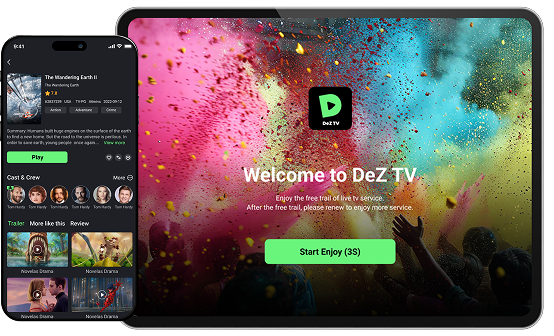
Enjoy top Indian channels, blockbuster movies and

international favorites
all in one place

Unlock 7 Days of Unlimited Entertainment Free!

7 DAYS FREE TRIAL • 7 DAYS FREE TRIAL • 7 DAYS FREE TRIAL • 7 DAYS FREE TRIAL • 7 DAYS FREE TRIAL • 7 DAYS FREE TRIAL • 7 DAYS FREE TRIAL • 7 DAYS FREE TRIAL • 7 DAYS FREE TRIAL • 7 DAYS FREE TRIAL • 7 DAYS FREE TRIAL • 7 DAYS FREE TRIAL • 7 DAYS FREE TRIAL • 7 DAYS FREE TRIAL • 7 DAYS FREE TRIAL • 7 DAYS FREE TRIAL •

Why choose DeZ TV?

Download DeZ TV Today!

Enjoy seamless streaming on all your Android devices

How To Install

DeZ TV on Mobile

  1. Visit the official website “https://deztv.com/
  2. Download “Mobile” APK file
  3. Allow device to install the app and follow these steps to install the app
       – Tap “Install anyway.”
       – Tap “More details.”

Note: Do not tap “Got it” to ensure the app installs successfully.

How To Install

DeZ TV on Mobile

Downloader

  1. Go to  and download
”Downloader by AFTVnews”
  2. Open the AFTV app
and type “5617716
  3. Follow the install instructions
  4. Enjoy your DeZ TV

Official website

  1. Visit the official website
“www.deztv.com”
  2. Download the APK file
from TV version
  3. Tap “OK” to start download
  4. Tap “Install” to start install the app
  5. Enjoy your DeZ TV

Direct URLa

  1. Open the browser app on your TV
  2. Enter URL “dl.deztv.com”
  3. Tap “OK” to start download
  4. Tap “Install” to start install the app
  5. Enjoy your DeZ TV

Join Our Exclusive WhatsApp Community

Get instant updates, chat in real-time, and never miss new releases or promotions.

Choose Your Perfect Plan

Enjoy a 7-Day Free Trial – Try DEZ TV risk-free. Explore all channels, movies, and series before you subscribe!

Monthly

Enter your description
$ 39
99
Monthly
  • List Item #1
  • List Item #2
  • List Item #3
Popular

Quarterly

Annual

Monthly

$6.99 /M

Have 30 days of fun on 1 TV
+ 1 Mobile.

  • 2 Devices: 1 TV app + 1 Mobile app (Add TV and Mobile Icon)
  • 30 day access
  • No code is required
  • Compatible with Android devices*

*(Android 4.4 or above. Includes TV Box, TV Stick, Smart TV, Chromecast with Android system.)

Quarterly

Annual

Find quick answers to the most common questions about DEZ TV.

DEZ TV is a Live TV & VOD app, available for Android devices, with more than 100,000+ movies & series and 160+ channels, including the best in sports, news, and entertainment.

The app is compatible with:

  • Android smartphones.
  • Android TV BOX.
  • Android TV
  • TV Stick.


DEZ TV is a Live TV & VOD app, available for Android devices, with more than 100,000+ movies & series and 160+ channels, including the best in sports, news, and entertainment.

The app is compatible with:

  • Android smartphones.
  • Android TV BOX.
  • Android TV
  • TV Stick.


We offer a 7-day free trial for a new device registered. Please make sure that the device has not been activated the DEZ app before.


You can register in two ways: with an email or phone number directly from the app.
Steps to register:

    1. Enter your email address or mobile phone and click on the “Send code” button.
    2. Now access your account and copy the 4-digit code we sent to you (remember to check your email or message).
    3. Return to the registration page and paste the code in the “4-digit code” field.
    4. Create a password.
    5. Click “Submit”.


Ready! Welcome to the DEZ TV family!

To recover your password or create a new account, check your “Spam” folder after clicking “Send code” to receive the verification code, as it may be marked as spam by your email provider.

How to reset my DEZ TV password?

Website
1. Access: https://deztv.vip/forgot-password
2. Select your account type (e-mail or phone).
3. Click “Send code” to receive a 4-digit verification code (in case your account is an e-mail, we suggest you check your e-mail spam box).
4. Place this 4-digit code in the indicated space and create a new password.

App:

1. Back to login page and click forgot password.
2. Select your account type (e-mail or phone).
3. Click “Send code” to receive a 4-digit verification code (in case your account is an e-mail, we suggest you check your e-mail spam box).
4. Place this 4-digit code in the indicated space and create a new password.

Note: you can only reset your password, it is not possible to reset your login account.

Looking for more answers? View all FAQ’s

AdBlock

We rely on ads to maintain this site. Disabling your ad blocker helps us serve you better.